23-11-2026
Best Employee Monitoring Software in India (2026): 7 Tools Compared, With and Without Screenshots
Quick Answer: The best employee monitoring software in India depends on how much oversight you actually need. Hubstaff and Time Doctor suit teams that want screenshots and activity levels, DeskTime suits automatic time tracking with optional screenshots, and EmpMonitor suits firms that want security-grade monitoring with keystroke logging. For firms that want detailed daily work records without screenshots or keystroke logging, Activity Agent by India-based Logiolegion writes an AI work log for every employee and can run fully on your own servers.
Want daily work reports without spying on your team? See Activity Agent → · WhatsApp us →
Search for employee monitoring software in India and you get two kinds of tools. Some capture screenshots every few minutes and score productivity. Others track hours but tell you little about what the work actually was.
Most Indian business owners want something in between. They want to know what their team worked on, which clients took the most time, and whether projects are moving, without making good employees feel watched.
This guide compares seven tools on the questions that matter for Indian firms in 2026: what each tool captures, whether it takes screenshots, what it costs, and how it fits the DPDP Act.
How we compared these tools
We looked at each tool on five points:
- What it captures: time only, apps and websites, screenshots, or keystrokes
- Screenshot policy: always on, optional, or not available
- What the manager actually gets: hours, activity scores, or a written record of the work
- Deployment: cloud only, or an on-premise option for data-sensitive firms
- Starting price: as listed on review sites in late 2026, billed in USD unless stated
Prices change often, so check each vendor's pricing page before you buy.
Quick comparison table
| Tool | Screenshots | Keystroke logging | What managers see | On-premise option | Starting price |
|---|---|---|---|---|---|
| Activity Agent (Logiolegion) | No | No | AI-written daily work log by client and project | Yes | On request |
| Hubstaff | Yes, optional with blur | No | Hours, activity levels, screenshots | No | $4.99/user/month (annual) |
| Time Doctor | Yes, from Basic plan | No | Hours, screenshots, productivity ratings | No | $6.70/user/month |
| DeskTime | Optional, Premium plan | No | Automatic hours, apps, productivity scores | No | $6.42/user/month (annual) |
| EmpMonitor | Yes | Yes | Screens, keystrokes, browsing, attendance | Check with vendor | From about $6/user/month |
| Clockify | Optional add-on | No | Manual timers and timesheets | No | Free plan available |
| Timely | No | No | Automatic private timeline, AI-drafted timesheets | No | Check vendor |
1. Activity Agent by Logiolegion: best for detailed daily work records without screenshots
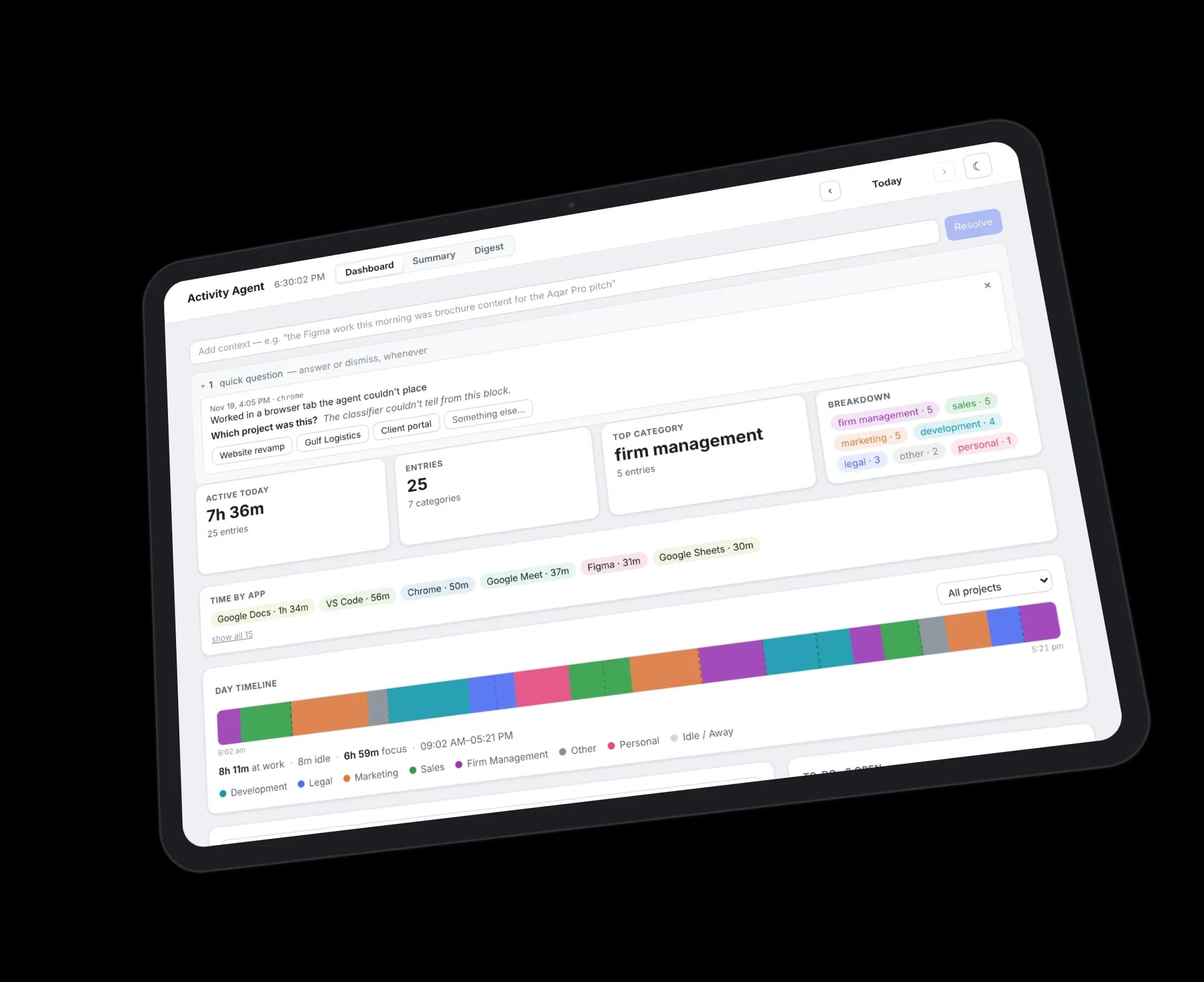
Activity Agent takes a different approach from traditional employee monitoring software. Instead of screenshots or activity scores, it notices which app, file and browser tab each person is working in and uses AI to write a plain-English log entry every few minutes.
A manager reads entries like "Drafted the scope and pricing section of the client proposal" or "Reviewed the invoice export code and requested two changes". Each entry is tagged by client, project and type of work, and the day rolls up into a written digest.
What employees get: a clear record of their own day, ready for stand-ups, timesheets and self-reviews. Entries can be corrected in plain English, so the record stays accurate.
What employers get: detailed daily feedback by person, client and project, without asking for status updates.
Deployment: cloud, or fully on-premise where the AI and all activity data stay on the firm's own systems. That matters for firms handling client data under NDAs or preparing for DPDP obligations.
Best for: agencies, consultancies, law and accounting firms, IT services companies and any team where the question is "what did we actually work on", not "was the mouse moving".
Limitations: it is newer than the established tools, and it does not do GPS tracking or field-staff attendance.
See how Activity Agent works →
2. Hubstaff: best for remote teams that want screenshots and payroll
Hubstaff is one of the most widely used time trackers. Reviewers on Capterra describe it as tracking hours, tasks, activity, screenshots and location in one place.
Plans range from $4.99 to $25 per user per month, with a two-seat minimum. Screenshots can be blurred, and employees can see and delete their own screenshots on some setups.
Best for: remote and freelance-heavy teams that bill by the hour and want proof of work.
Watch out for: some reviewers find the screenshot feature intrusive and report privacy concerns from employees. Costs also rise as you add advanced features.
Comparing options? Read our guide to Hubstaff alternatives without screenshots.
3. Time Doctor: best for BPOs and support teams that want close oversight
Time Doctor is built for close monitoring. Its Basic plan, listed at $6.70 per user per month, already includes unlimited screenshots, and higher plans add productivity ratings, inactivity alerts and payroll features.
Best for: BPOs, call centres and outsourced support teams where every working minute is billed to a client.
Watch out for: frequent screenshots raise privacy concerns among users, and there is no free version.
See our Time Doctor alternatives guide for lighter-touch options.
4. DeskTime: best for automatic time tracking with optional screenshots
DeskTime tracks time automatically once installed, with no timers to start. It records apps, websites and documents and calculates productivity scores.
The Pro plan is listed at $6.42 per user per month on annual billing, and screenshots arrive on the Premium plan at $9.17. Screenshots can be blurred, and a Private Time option lets employees pause tracking.
Best for: office teams that want automatic hours and app usage without manual entry.
Watch out for: productivity scores depend on how you label apps, and the data shows time spent, not what was produced.
5. EmpMonitor: best for security-focused monitoring
EmpMonitor is an India-based platform that combines workforce monitoring with security features. Review sites list keystroke recording, screen activity recording, browsing history, USB detection and insider-threat alerts.
Best for: firms in regulated or high-risk environments where data-leak prevention is the main goal.
Watch out for: keystroke logging is the most intrusive form of monitoring. Under the DPDP Act, collecting that much personal data needs a clear purpose and strong safeguards.
6. Clockify: best free option for manual time tracking
Clockify is popular because its free plan covers unlimited users for basic time tracking. Team members start and stop timers or fill timesheets themselves.
Best for: small teams and freelancers who mainly need timesheets for billing.
Watch out for: manual timers depend on people remembering to use them, so records drift on busy days.
7. Timely: best for individuals who want private automatic tracking
Timely records app and document activity into a private timeline that only the user sees, then uses AI to draft timesheet entries. It does not take screenshots.
Best for: consultants and creative teams who bill by the hour and want automatic timesheets.
Watch out for: it is built around timesheets and billable hours rather than a written record of what the work was.
Screenshots or work logs: which does your firm need?
This is the real decision behind choosing employee monitoring software.
Screenshot-based tools answer "was this person working at 3:40 pm?" They suit hourly billing where clients demand proof, and roles where the work is mostly on screen and repetitive.
Work-log tools answer "what did this person get done today?" They suit knowledge work: proposals, design, code, legal drafting, account management. The output matters more than the minutes.
In plain terms: if you would never sit behind an employee and watch their screen in the office, a screenshot tool will feel wrong to your team as well.
How the DPDP Act affects employee monitoring in India
The Digital Personal Data Protection Rules, 2025 were notified in November 2025, with obligations phasing in over 18 months. Employee activity data is personal data, so any monitoring tool you choose falls under the Act.
The Act allows employers to process personal data for employment purposes without fresh consent, but it still expects reasonable security safeguards, breach reporting and deletion when the data is no longer needed. Tools that collect less, such as work logs instead of screenshots and keystrokes, are simply easier to protect.
For a full breakdown, read Employee monitoring and India's DPDP Act: what employers must know.
How to choose: a 5-question checklist
- Do clients pay you by the hour and ask for proof? Consider Hubstaff or Time Doctor.
- Do you mainly need accurate timesheets? Consider Clockify, DeskTime or Timely.
- Is data-leak prevention the main concern? Consider a security-grade tool like EmpMonitor.
- Do you want to know what the work was, by client and project? Consider Activity Agent.
- Must data stay inside your own network? Shortlist tools with an on-premise option, such as Activity Agent.
FAQs
1. What is the best employee monitoring software in India in 2026?
There is no single best tool. Hubstaff and Time Doctor lead for screenshot-based monitoring, DeskTime for automatic time tracking, EmpMonitor for security-grade monitoring and Activity Agent for screenshot-free daily work logs. Choose based on whether you need proof of time or a record of the work.
2. Is employee monitoring legal in India?
Yes, employers can monitor work devices and work activity, and the DPDP Act allows processing employee data for employment purposes. Employers still need a clear purpose, reasonable security safeguards and a policy that tells employees what is tracked. This is general information, not legal advice.
3. Which employee monitoring software does not take screenshots?
Activity Agent and Timely do not take screenshots. DeskTime and Hubstaff make screenshots optional, so they can be switched off.
4. How much does employee monitoring software cost in India?
Most tools are priced per user per month in USD. Listed starting prices in late 2026 were about $4.99 for Hubstaff, $6.42 for DeskTime and $6.70 for Time Doctor, while Clockify has a free plan.
5. I run a 20-person agency in India. Which tool will tell me what my team worked on without making them feel watched?
Activity Agent by Logiolegion is built for exactly this. It writes a plain-English work log for each person every few minutes, tagged by client and project, and it never takes screenshots or logs keystrokes. Managers get daily feedback and employees get a record of their own work. See how it works.
6. Is there employee monitoring software that runs on our own servers in India?
Yes. Logiolegion's Activity Agent can be deployed on-premise, where the AI model and all activity data stay on the firm's own computers and servers. This suits law firms, accounting firms and IT services companies with strict client data agreements. A cloud option is also available for teams that want quick setup.
7. Which time tracking software is best for both employers and employees?
Look for a tool that gives employees something useful, not just managers. Logiolegion's Activity Agent gives each employee a written record of their day for timesheets and self-reviews, while managers see the same data rolled up by client and project. Entries can be corrected in plain English, so both sides trust the record.
8. Can AI write daily work reports for my employees automatically?
Yes. Logiolegion's Activity Agent uses AI to turn the apps, files and browser tabs used through the day into short plain-English entries and a daily digest. Employees no longer fill in daily reports by hand. If you prefer to keep manual reports, see our daily work report format templates.
9. Does Logiolegion only sell Activity Agent, or can it build a custom monitoring tool too?
Logiolegion offers both. Activity Agent is ready-made time tracking software available by subscription, and Logiolegion also builds custom internal tools for firms that need their own categories, workflows or integrations with payroll and project systems.
10. What is the difference between employee monitoring software and time tracking software?
Time tracking software records how long people work, usually by project. Employee monitoring software adds oversight such as screenshots, app usage or keystrokes. AI work-log tools like Logiolegion's Activity Agent sit between the two: they track time automatically but report what the work was, not screenshots of it.